
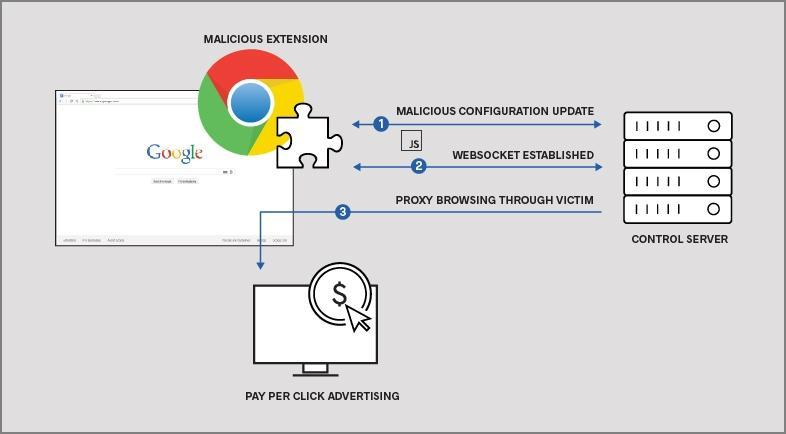

Browser Extension Malware: The Threat Hiding in Plain Sight
Browser extensions are marketed as productivity boosters—ad blockers, coupon finders, note-taking tools, password helpers. Millions of people install them without a second thought.
That’s exactly why attackers love them.
Malicious browser extensions are one of the most underrated and effective attack vectors today because they live where your most sensitive activity happens: inside your browser.
Why Browser Extensions Are So Dangerous
Your browser is where you:
- Log in to email and bank accounts
- Access work systems and cloud apps
- Enter passwords and payment details
- Manage social media and personal data
Extensions often have permission to:
- Read everything on the pages you visit
- Modify website content
- Capture keystrokes
- Access cookies and session tokens
In other words, a malicious extension doesn’t need to “hack” you.
It simply watches everything you do.
How Malicious Extensions Get Installed
Most users don’t install obviously harmful software. Instead, extension malware spreads through more subtle paths:
1. Legitimate Extensions That Turn Malicious
Some extensions start out clean, gain thousands of users, then update with malicious code after trust is established.
2. Fake or Cloned Extensions
Attackers copy the name, icon, and description of a popular extension and publish a look-alike version.
3. Bundled Installs
Free software prompts users to “enhance your browsing experience” during installation, quietly adding extensions.
4. Compromised Developer Accounts
If an extension developer’s account is breached, attackers can push malicious updates to every user automatically.
No warning. No prompt. No visible change.
What Extension Malware Can Do
Depending on permissions, a malicious extension may be able to:
- Steal usernames and passwords
- Hijack logged-in sessions (even with MFA enabled)
- Inject fake login pages
- Redirect you to phishing sites
- Read emails and messages in web apps
- Monitor browsing behavior for profiling or resale
Because the browser already trusts the extension, traditional antivirus tools often do not catch this activity.
Why Users Don’t Notice
Extension malware is designed to be quiet.
- Your browser still works normally
- Pages load as expected
- There are no pop-ups or crashes
- Performance impact is minimal
From the user’s perspective, nothing looks wrong—until accounts are compromised or data is abused elsewhere.
Warning Signs You Should Not Ignore
While many malicious extensions stay stealthy, some red flags include:
- Extensions you don’t remember installing
- Extensions with permissions that don’t match their purpose
- Sudden changes to search engine or homepage
- Unexpected logouts or security alerts from accounts
- Extensions that require access to “all websites” without a clear reason
If you see these signs, assume risk—not coincidence.
How to Protect Yourself
Be Ruthless With Extensions
- Only install extensions you truly need
- Avoid “all-in-one” or vague utility tools
Review Permissions Carefully
If an extension requests access to everything, ask why.
If the answer isn’t clear, don’t install it.
Audit Regularly
At least quarterly:
- Review installed extensions
- Remove anything unused or unfamiliar
Keep Browsers and Devices Updated
Security patches matter—especially for browsers.
Use a Dedicated Password Manager
If an extension is compromised, you want passwords protected behind a separate encrypted vault, not exposed through the browser.
Final Thought
Browser extension malware works because it feels harmless.
It doesn’t look like a virus.
It doesn’t behave like ransomware.
It doesn’t announce itself.
It simply lives inside your browser, quietly observing everything you trust it with.
If you care about your accounts, your identity, and your data, treat browser extensions as software with real risk—because that’s exactly what they are.